Device Details
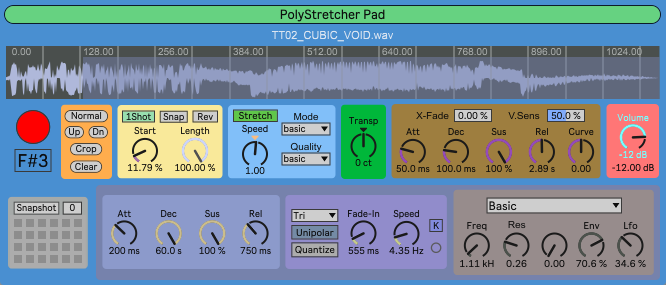
Overview
| Name | Version: | PolyStretcher Mk2 1.1 |
| Author: | opticon93 |
| Device Type: | Instrument |
| Description: | Hi, This is a 10-note polyphonic sample player with independent time-stretching and pitch-shifting. Most of the controls are self-explanatory, at least audibly. I've updated all of the essential circuits with cybernetic components. I’ve also upgraded the filter to a bypassable Abl.dsp Meld Filter which has 14 different filter types and dedicated Envelope and LFO. Unfortunately, the bundled version of Max is at 9.09, which doesn't have the Meld Filter yet. It won't be generally available until the bundled version reaches 9.1. I guess its something to look forward to. If you have Max 9.1 already (you can install the Demo version), then you're good to go. Otherwise, you will need to make do with the Basic Filter. Many of the knobs are extremely fine grained under the hood. Use the Shift key with the arrow keys or mouse to speed up or slow down the scrolling. Share and Enjoy |
Details
| Live Version Used: | 12.3.2 |
| Max Version Used: | 9.1.1 |
| Date Added: | Jan 01 2026 01:20:44 |
| Date Last Updated: | Jan 04 2026 17:58:38 |
| Downloads: | 136 |
| ⓘ License: | AttributionNonCommercialShareAlike |
Average Rating
Log in to rate this device |
-n/a- |
Files
| Device File: | PolyStretcher Mk2.amxd |
Comments
Odd....the image above has black letters while on my Live it is white until a parameter is pressed.
Posted on January 01 2026 by irishmos |
Report Issue
Hi, Thank you.
Thats really depressing. I downloaded and tried it on both my home computers running newly installed Live12/Max9 with no problems. You should at least be able to trigger it with a midi clip or keyboard?
Are there any error messages in the Max Console Window? (other than "none: cant open", "get: no valid object set" or "Live API is not initialized, use live.thisdevice to determine when initialization is complete")
I'm not sure, but I think the abl.dsp objects require Max 9. I'm planning an update that allows you to bypass the filter completely.
Anybody else getting errors?
Thats really depressing. I downloaded and tried it on both my home computers running newly installed Live12/Max9 with no problems. You should at least be able to trigger it with a midi clip or keyboard?
Are there any error messages in the Max Console Window? (other than "none: cant open", "get: no valid object set" or "Live API is not initialized, use live.thisdevice to determine when initialization is complete")
I'm not sure, but I think the abl.dsp objects require Max 9. I'm planning an update that allows you to bypass the filter completely.
Anybody else getting errors?
Posted on January 01 2026 by opticon93 |
Report Issue
Happens man
It's the only one I can't get results out of with my limited max capacities with catalina
It's the only one I can't get results out of with my limited max capacities with catalina
Posted on January 02 2026 by irishmos |
Report Issue
Hi! Thanks for sharing your devices! I noticed that this doesn't work with the bundled version of Max, but only with Max 9.1 due to the meldfilter object
Posted on January 02 2026 by enchse |
Report Issue
Hi
I've made the Meld Filter Bypassable and added a Basic filter that should work in any version of Max.
Hopefully, I didn't break anything in the process.
Please let me know
I've made the Meld Filter Bypassable and added a Basic filter that should work in any version of Max.
Hopefully, I didn't break anything in the process.
Please let me know
Posted on January 02 2026 by opticon93 |
Report Issue
It's seeing the trigger via midi key because the C3 button is engaging with key press but no sound being produced.
Posted on January 02 2026 by irishmos |
Report Issue
Hi Folks,
So yeah, the bundled version of Max is 9.09, which doesn't have the Meldfilter yet. It should be available when the bundled version reaches 9.1.
In the meantime, I've verified that the current version works on Live Demo using the Basic filter or Bypassing it altogether.
So yeah, the bundled version of Max is 9.09, which doesn't have the Meldfilter yet. It should be available when the bundled version reaches 9.1.
In the meantime, I've verified that the current version works on Live Demo using the Basic filter or Bypassing it altogether.
Posted on January 03 2026 by opticon93 |
Report Issue
Bypass of filter does produce sound for me
Posted on January 03 2026 by irishmos |
Report Issue
This morning, I noticed sample length only works in loop mode. Perhaps, that's by design. Sample start works in all. Basic filter also produces sound like bypass.
Posted on January 03 2026 by irishmos |
Report Issue
I guess thats by design. A large part of the guts are from the Pitch and Time Machines Live Pack. In particular, the entire Start/Length/Loop/Reverse circuit is from the More Simpler device. I was really hoping they would have implemented the Reverse better, using the Loop Endpoint instead of the End of the sample or whatever it does when Looping is off (I have no idea, I think it starts at the Start position and goes to the beginning of the file.) One day I'll figure it out.
When Looping is off, it is in 1-Shot mode and plays to the end of the file. I guess I should change the button text.
When Looping is off, it is in 1-Shot mode and plays to the end of the file. I guess I should change the button text.
Posted on January 03 2026 by opticon93 |
Report Issue
FYI: If you switch over to the newest Demo version of Max/MSP, the Meld Filter works.
Posted on January 04 2026 by opticon93 |
Report Issue
Login to comment on this device.
Browse the full library
Can't get it to trigger a sound with c3. I've tried every logical approach.
First of your great devices I've had any issue with.
If I had one quick observation (nitpick) the white lettering is a bit hard with those of us with aging eyes! LOL